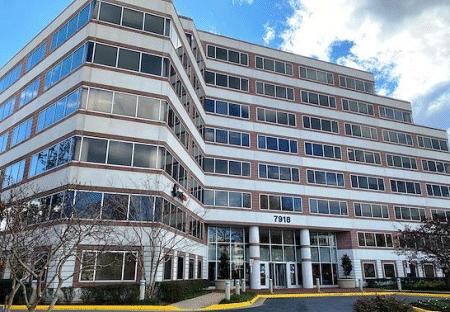
Learn today's top IT technologies at our Tysons Corner / McLean, Virginia training center today. Located in Northern Virginia's largest commercial district, our Tysons Corner / McLean center is on Jones Branch Drive in an eight-story office building.
Our computer training center is on the 4th floor of the building. It is equipped so you can learn today's in-demand computer technology hands-on to advance your IT skills and improve your career opportunities.
Our McLean computer center backs up to I-495 / Capital Beltway, is next door to the Hilton McLean / Tysons Corner hotel and it is about a half mile from the Kaiser Permanente Tysons Corner Medical Center. It has direct access for I-495 and is easily accessible from Tyson's Corner, Dulles Airport Road (Rt. 267) and Leesburg Pike (Rt. 7). The Tysons Corner Metro Station and the Spring Hill Metro Stations less than a mile from our training center.
In the area surrounding our McLean, VA computer training center you'll find a variety of restaurants and retail stores including those in the multi-tiered shopping mall of Tysons Galleria.
NOTE: ONLC Training Centers is a business-to-business training provider in the State of VA. Though we welcome private citizens to attend our live, instructor-led computer courses, Virginia prohibits this option if you are personally paying for training you are attending in VA. In those instances we can only accept payment made by a business or organization. See business to business for more info.
(See more ONLC computer training locations in Virginia.)

IT training course are available in the following subjects - see the McLean, Virginia (VA) Training Schedule for a complete list of IT computer classes.
|
ONLC's classes are fully-interactive, hands-on* training with an online instructor. Class Format FAQs. (*Business process classes not related to a specific software application are commonly more lecture or discussion oriented.) |
||
|
A+ Certification Access Access VBA Accounting, Bookkeeping, Payroll (self-study) Active Directory Adobe Acrobat Adobe Animate Adobe Captivate Adobe Certification Adobe Dreamweaver Adobe Illustrator Adobe In-Design Adobe Lightroom Adobe Photoshop Adobe On-Demand (self-study) AI / Artificial Intelligence Alteryx Analytics & Reporting Advanced Security Practitioner Angular Applied Skills Army Cool ASP / Active Server Pages AutoCAD AutoCAD On-Demand (self-study) Autodesk AWS / Amazon Web Services AWS Certification Azure Azure On-Demand (self-study) Business Analyst CBAP Business Intelligence BI Business Process Business Skills (self-study) C# Camtasia Canva CAPM Captivate CareerPath Programs (many topics) CCISO CCNA CEH / Ethical Hacker ChatGPT CHFI Cisco Cisco On-Demand (self-study) CISSP Citrix Civil 3D Claude Cloud+ CND CompTIA CompTIA On-Demand (self-study) Computer Programming Copilot / Copilot Chat Crystal Reports Crystal Reports On-Demand (self-study) CSS / Cascading Style Sheets Cybersecurity CySA+ |
Data+ Data Visualization Docker DoD 8140 Dreamweaver EC Council Excel Excel Analytics Excel BI Excel Forecasting Excel Macros Excel Power User Excel VBA Exchange Server Fabric Forms Generative AI GitHub Google Ads Google Analytics Google Docs Google Drive Google Forms Google Gemini Google Sheets Google Slides Google Workspace Group Training (any topic!) HTML IAM / IAT Certification iiBA Illustrator InDesign Inventor ITIL Certification Java JavaScript Kubernetes Lightroom Linux Linux+ Low-Code/No-Code Machine Learning Microsoft 365 Microsoft 365 On-Demand (self-study) Microsoft Certification Microsoft Certified Associate Microsoft Certified Expert Microsoft Certified Fundamentals Microsoft Office Microsoft Project Microsoft Security Microsoft Teams MOS Certification MySQL Network+ Office / Office 365 On-Demand (self-study) OneNote Open Source Oracle Oracle PL/SQL Outlook |
PC Introduction (self-study) PenTest+ Photoshop PMP Exam Prep PostgreSQL Power Apps Power Automate Power BI Power Fx Power Map Power Pivot Power Platform Power Query PowerPoint PowerShell Programming Project Management Project+ Publisher Python Qlik Sense QuickBooks R Programming Revit Revit MEP RPA Salesforce SAS Scripting Scrum Security+ SecurityX Selenium WebDriver Server+ SharePoint SketchUp Software Quality Assurance Software Testing Splunk SQL / SQL Server Storyline 360 Tableau Teams Tech+ Transact SQL Use Case Development Vibe Coding Virtualization Visio Visual Basic for Applications Visual Studio VMware Web Design Web Development Windows 10 / 11 Windows Server Word WordPress Zapier |
|
We invite comparisons between ONLC Training and other industry-leading IT training providers such as New Horizons, Global Knowledge, and Learning Tree International. We are certain that when you review our breadth of class topics, price, and number of locations you will select ONLC Training. Why you should choose ONLC. |
||

This location serves the following communities:
In Virginia: Alexandria City– Alexandria; Arlington County – Arlington and Fort Myer; Fairfax County – Alexandria, Annandale, Burke, Centreville, Chantilly, Clifton, Dunn Loring, Fairfax, Fairfax Station, Falls Church, Fort Belvoir, Great Falls, Greenway, Herndon, Lorton, Mc Lean, Merrifield, Mount Vernon, Newington, Oakton, Reston, Springfield, Vienna and West Mclean; Fairfax City – Fairfax; Falls Church City – Falls Church; Loudoun County – Ashburn, Chantilly, Dulles and Sterling; Manassas City – Manassas; Manassas Park City – Manassas; Prince William County – Manassas and Occoquan
In DC: District of Columbia – Washington
In Maryland: Montgomery County – Ashton, Beallsville, Bethesda, Boyds, Brinklow, Cabin John, Chevy Chase, Derwood, Dickerson, Gaithersburg, Garrett Park, Germantown, Glen Echo, Kensington, Montgomery Village, Olney, Poolesville, Potomac, Rockville, Sandy Spring, Silver Spring, Spencerville, Takoma Park and Washington Grove; Prince Georges County – Fort Washington, Hyattsville, Mount Rainier, Oxon Hill and Temple Hill



 LinkedIn
 YouTube
 Instagram
 TikTok
 Facebook