
Remote Classroom Instruction (RCI™) from ONLC is a cutting-edge solution designed to bring the classroom directly to you, regardless of your location.
RCI™ is a unique platform that bridges the gap between virtual and physical classroom experiences. It allows learners to connect to live, instructor-led training sessions remotely. This innovative model leverages advanced technology to deliver real-time interaction, hands-on labs, and expert instruction. Whether you're at one of ONLC's training centers or participating from another location, RCI™ ensures an immersive, seamless educational experience.
In response to the declining demand for traditional classroom-based training, many companies have shifted to virtual training that can be accessed from home or the office. While this delivery method works for those with the right equipment and a quiet environment, not everyone has that advantage.
At ONLC Training Centers, we believe the classroom remains a vital part of the learning experience—even when the training is delivered online. This belief drives our commitment to providing dedicated classroom environments. We invested over $18 million to establish our physical training centers, creating spaces specifically designed for our live, online, instructor-led courses.
Our Remote Classroom Instruction model has been widely embraced, earning ONLC recognition from Inc. Magazine as the fastest-growing Microsoft-authorized training company for consecutive years. Today, we are proud to be the largest IT training provider in North America, with a network of locations across the United States—more than any other technology training company.
If you're considering a class with ONLC, take a moment to learn more about our Remote Classroom Instruction model below. Discover why thousands of individuals choose ONLC Training Centers each month for their IT and computer training needs.
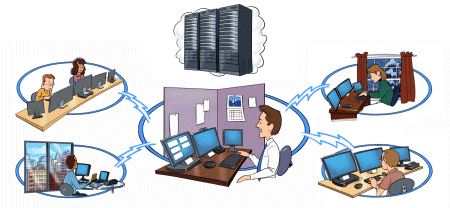
At ONLC, our scheduling begins with a centralized master calendar of classes. Once a class is scheduled, it becomes accessible at all of our training locations on that date. For instance, if Excel Advanced is scheduled for Tuesday two weeks from now, participants can register to attend from any of our locations—just be sure to register early to secure your spot!
On the day of class, we bring everyone together using advanced conferencing technology. Students from locations across the country—sometimes each one from a different city—can connect seamlessly with an instructor conducting the class online.
Our instructors are highly skilled at engaging with remote learners, ensuring no student is at a disadvantage. Since instructors are rarely in the same physical room as any student, everyone enjoys equal access to their expertise.
When it comes to class size, we prioritize quality over quantity. Our average class includes just 8 participants, with a maximum typically of only 12. This approach mirrors the standard we upheld in traditional, face-to-face classrooms. Many of our classes even run with significantly fewer students, offering an intimate, focused learning experience.
By pooling enrollments from multiple locations, we maintain one of the lowest cancellation rates in the IT training industry. This means you can count on your scheduled class running as planned, providing greater reliability for your training needs.
Although our classes can be taken from home or the office, many of our students choose to attend from an ONLC training center. These locations offer a distraction-free environment, ideal for focused learning. This preference highlights the enduring value of classroom-based training.
When you attend one of our classes, you'll learn in a professional office environment. Our locations are conveniently located in either a bustling downtown business district or a well-known suburban office park. We carefully select safe, accessible, and professional locations to ensure a seamless experience.
Suburban locations offer free on-site parking, while urban sites may require you to arrange parking at your own expense. In major urban centers, you'll typically go through building security before entering. Your name will usually be on a pre-approved guest list, and you'll need to present a valid photo ID for verification.
At the receptionist's desk, simply provide your name and the class you're attending. You'll receive a brief tour of the facility, where key amenities such as restrooms and break areas will be pointed out. From there, you'll be guided to your classroom.
You'll have access to a private, office-sized classroom which you will usually have all to yourself.
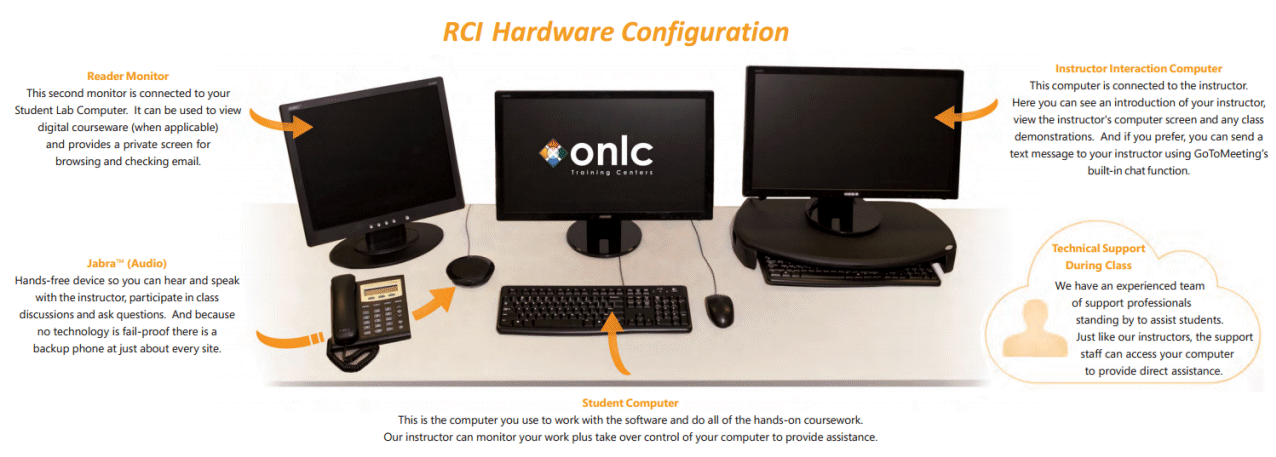
To take notes, you're welcome to bring a laptop—although some prefer pencil and paper. Beyond that, your classroom will be fully prepared with:
Our facilities are designed to provide a professional, comfortable, and efficient learning environment, allowing you to focus entirely on gaining new knowledge and skills.
Experience the quality of our training firsthand—we're confident you'll be impressed. That's why all of our instructor-led training (ILT) courses come with a satisfaction guarantee.
“If you are not completely satisfied with our training for any reason, we'll refund 100% of your purchase price.”
Whether you join our live, instructor-led sessions in a Remote Classroom Instruction setting or attend from the comfort of your home or office, our guarantee remains the same.
For full details on our money-back guarantee, visit ONLC's guarantee.



 Top of page
 LinkedIn
 YouTube
 Instagram
 TikTok
 Facebook