
At ONLC Training Centers we believe the classroom is the centerpiece of a great learning experience. For live, instuctor-led computer training, the classroom provides an interruption-free environment where all of the hardware, software, and communication links are in place and ready for you to get straight to the business of learning.
As a response to the decline in demand for traditional classroom training, companies offered virtual training taken from your home or office. This type of delivery might be appropriate for someone who has all of the necessary equipment and a quiet place to learn. However, not everyone has that luxury.
ONLC Training Centers has a different philosophy. We feel that the classroom should be an important part of the training experience—even if the training is delivered over the internet. Our conviction to this idea is demonstrated by the fact that we opened hundreds of physical facilities from 2005 to 2011, spending over $18 million during that period to make classrooms available for our live, online, instructor-led classes.
The most locations. Our Remote Classroom Instruction solution has been well-received by the market. In fact, Inc. Magazine recognized ONLC as the fastest growing Microsoft authorized training company multiple years in a row. And we have grown to be the largest technology training company in North America with more locations than any other IT training provider—hundreds of centers across the USA.
Decide for Yourself. If you are thinking about taking a class with us, learn more about our Remote Classroom Instruction model described below. You’ll get a good sense of why thousands of individuals each month select ONLC Training Centers for their computer training.
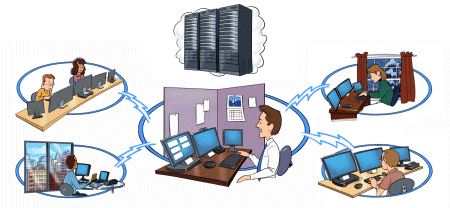
We schedule each class in every location. It all starts with our master calendar of classes. When we schedule a class, we make it available at all of our training locations on that date.
For example, if Excel Advanced is scheduled on November 3rd, you can register for that class at any one of our locations (assumes early registration for availability).
Participants have equal instructor access. On the day of class, we use conferencing technology to connect all of the students participating in that class. It is not uncommon to have 8 students attending from classrooms in 8 different cities with an instructor teaching online. Our instructors are very practiced at working with remote students. In almost all cases, no students are in the same physical room as the instructor, giving everyone equal instructor access.
Small class size. And speaking of class enrollments, our average class size is 8 students. Some people think that just because a class is online, we set the maximum class size larger. That is not the case at ONLC. We use the same rule of thumb that we had for our traditional face-to-face classes. With few exceptions, our maximum class size is 12. And while the average class size is 8, we do run many classes with enrollments significantly less than that.
Low cancellations. By combining enrollments from multiple locations, we are able to cancel fewer than 3% of our classes. As a result, ONLC Training Centers has one of the lowest class cancellation rates in the IT training industry.
And a free classroom with every class. Our clients know that our classes can be taken from their home or office if they want. Even so, approximately 85 percent of students still choose to attend from an ONLC training location for an interruption-free learning environment. That is validation that clients prefer classroom training. Any company with a web site can say that it delivers training coast-to-coast, but ONLC is the only company that has invested in hundreds of facilities to really deliver on that promise.
First-class facilities. When you take a class at one of our facilities, you will be in a professional office building located in a popular suburban office park or downtown in a central business district. We select sites that are in safe, professional and convenient locations.
With secure access. Suburban locations typically have free parking adjoining the building while our urban sites will require you find parking on your own, at your expense. In addition, in our larger urban centers you will need to go through security before entering the building. In most cases, building security will have you on our list of guests for that day and you will need to show some form of picture identification.
Professionally staffed. When you get to the receptionist's desk, provide your name and the class that you will be attending. You will be given a quick tour of the facility, noting the rest rooms and break areas. Then you will be shown to your classroom.
With large and small classrooms. If you are the only person taking that class at that site, you will typically have a small office-size classroom to yourself. If others are attending the same class at that site, you could have a larger room where everyone sits together.
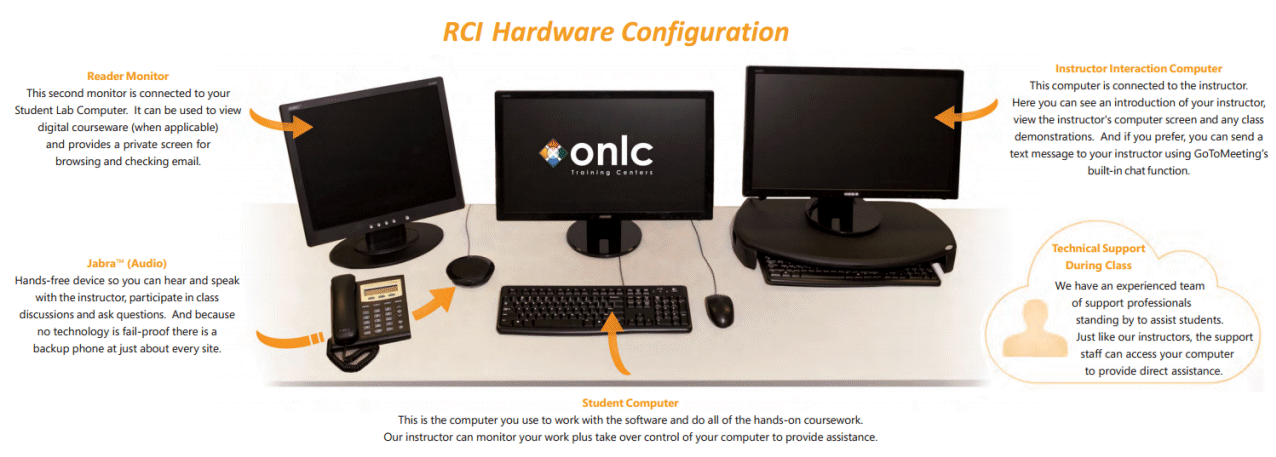
Ready for your course. For taking notes, you can bring your laptop or a pencil and paper. Aside from that, your classroom will be ready for you with:
Remote Classroom Instruction provides an interruption-free learning environment. Because we control all of the technical aspects of the room from software setup and computer hardware, to internet connections and telephone conferencing, all you need to do is show up and be ready to learn. We take care of the rest.
There is no better way for us to show you the quality of our training than to try it yourself. That's why we guarantee your satisfaction with all of our instructor-led training (ILT) classes.
“If you are not satisfied with our training for any reason,
we'll refund 100% of the purchase price.”
Whether you attend our live, instructor-led training in one of our Remote Classroom Instruction classrooms or from your home or office, the same guarantee applies. For more details about out money-back guarantee, see ONLC's guarantee.


 Top of page
 Facebook
 LinkedIn